Logging Levels Configuration
Logging acts as an essential tool for obtaining insights into code execution and addressing software development challenges. You can configure the verbosity of logs via log levels. Use GQLFORGE_LOG_LEVEL or GF_LOG_LEVEL environment variables to set the application's log level. The available log levels include:
error
This is the highest severity level. It indicates a critical issue that may lead to the failure of the program or a part of it.
GQLFORGE_LOG_LEVEL=error gqlforge <COMMAND>
# or
GF_LOG_LEVEL=error gqlforge <COMMAND>
warn
This log level signifies potential issues or warnings that do not necessarily result in immediate failure but may require attention.
GQLFORGE_LOG_LEVEL=warn gqlforge <COMMAND>
# or
GF_LOG_LEVEL=warn gqlforge <COMMAND>
info
This level offers general information about the program's execution, providing insights into its state and activities.
GQLFORGE_LOG_LEVEL=info gqlforge <COMMAND>
# or
GF_LOG_LEVEL=info gqlforge <COMMAND>
debug
The debug log level is useful for developers during the debugging process, providing detailed information about the program's internal workings.
GQLFORGE_LOG_LEVEL=debug gqlforge <COMMAND>
# or
GF_LOG_LEVEL=debug gqlforge <COMMAND>
trace
The trace log level is the most detailed logging level, used for fine-grained debugging. This level provides exhaustive details about the program's execution flow.
GQLFORGE_LOG_LEVEL=trace gqlforge <COMMAND>
# or
GF_LOG_LEVEL=trace gqlforge <COMMAND>
off
This level serves as a special indicator for generating no logs, allowing the option to disable logging entirely.
GQLFORGE_LOG_LEVEL=off gqlforge <COMMAND>
# or
GF_LOG_LEVEL=off gqlforge <COMMAND>
The default log level is info.
Log levels are hierarchical, meaning if you set the log level to a specific level, it includes all the levels above it. For example, setting the log level to info will include logs at the info, warn, and error levels, but exclude debug and trace logs.
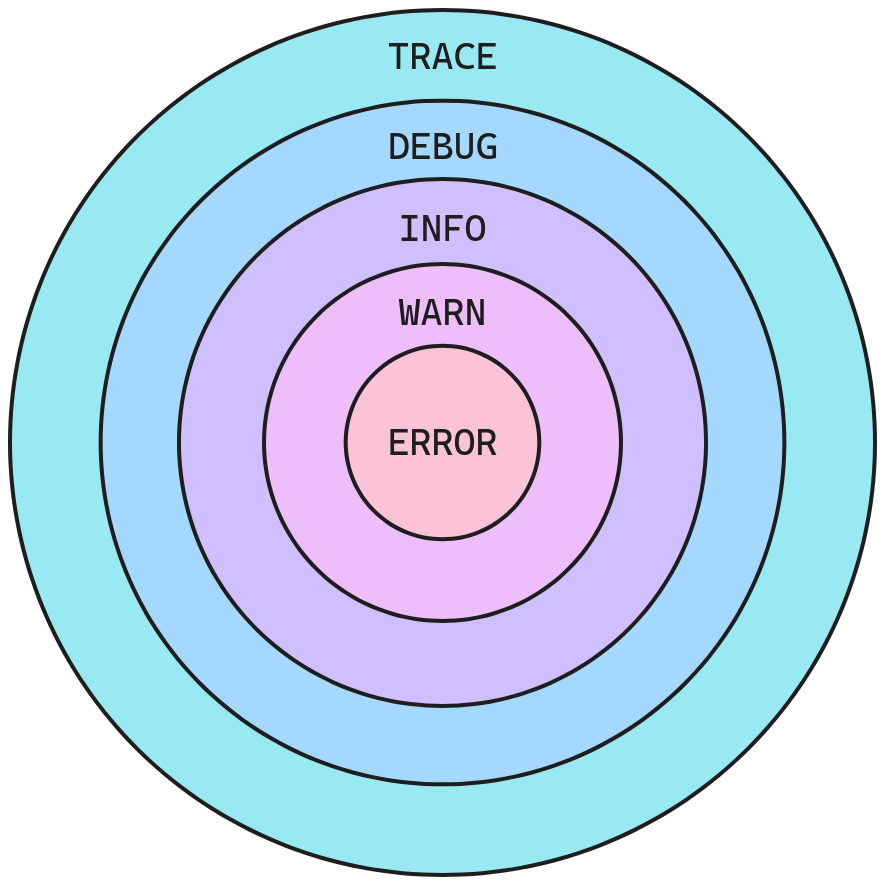
You can specify log levels in either uppercase or lowercase; both yield the same result. For example, GQLFORGE_LOG_LEVEL=DEBUG and GQLFORGE_LOG_LEVEL=debug are same.